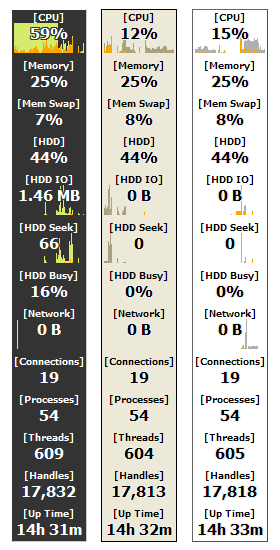
| 监视你的系统状态 Moo0系统监视器使你监视你的计算机中系统资源的使用情况。 它当前支持43种信息,例如CPU、内存和详细的硬盘使用情况。 使用这个软件,你会发现每一次是什么限制你计算机的性能。 提示: 需要更多皮肤? - 点击这里。 - 您可以通过双击缩小视图。 - 您可以通过按Shift键暂停自动隐藏功能。
评论:
俄语 (修订) 支持由 Max 提供。非常感谢! | |||||||||||||
| 页面标题: | ||||||||||||||
| 页面URL: | ||||||||||||||
| HTML 标签: | ||||||||||||||
| 语言: | 白俄罗斯语, 保加利亚语, 葡萄牙语(巴西), 中文(简体), 中文(繁体), 捷克语, 丹麦语, 荷兰语, 英语, 法语, 德语, 希腊语, 匈牙利语, 意大利语, 日语, 韩语, 波兰语, 俄语, Serbian (Cyrillic), Serbian (Latin), 西班牙语, 瑞典语, 土耳其语, 16 other languages (Partial) - [ 译者 (45) ] | |||||||||||||
| 操作系统: | Windows XP/Vista/7/8.1/10 | 易于使用: | 简单 | |||||||||||
| 版本: | 1.83 | |||||||||||||
| 最近更新于: | 2019/06/15 [ 更新历史 (64) ] | |||||||||||||
| PAD文件: | [ 如果你正在运行软件列表网站!…… ] | |||||||||||||
| 下载: |
| |||||||||||||
| 大小: | 4.67 MB | |||||||||||||
| 许可证: | 免费 (只可用于非商业的使用) 要在工作场所/网络咖啡吧中使用吗?
| |||||||||||||
| 反馈: | ||||||||||||||
| 常见问题: | ■ (Symptom) The program suddenly doesn't start up one day? stopped working properly? on Windows 10/8.1? This probably happens when "Windows SmartScreen" hinders our program from working. In this case, please try the following before the installation. 1. Before the installation, right-click on the installer file and open the file "Property". 2. At the bottom of "General" tab, if you see "Security: This file came from another computer...", select "Unblock" check box, and "Apply" and "OK". 3. If you install the program after it, it may be able to prevent many problems caused by "Windows SmartScreen" or some other security products. Or, you can actually turn off this problematic feature of Windows itself: (only if you feel too troublesome to do this every single time.) https://ugetfix.com/ask/how-to-disable-windows-smartscreen/ This happens to every software vendor who doesn't or can't donate $300 to Microsoft every single year (EV signature purchase), and especially when the program file is still new. This kind of problems started to get reported since the early of 2019. (Symptom) Error message: "Unknown locale of Windows" / Some field values always stay as 0. / It freezes. / It takes long time to start up. Please generate an error report file through "About -> Generate Error Report File.." menu and check the lines under [Performance Counter Objects]. If there is any data under it, please send the file to us. We can support your system using the information. If there is nothing under it, it means your performance monitoring mechanism has been corrupted by some other programs. (It is well known that many old programs keep breaking the mechanism.) In the case it's been broken, you may try to fix it as referred here: How to manually rebuild Performance Counter Library values (Symptom) "CPU Temperature" field always shows "-----". The CPU temperature field currently supports recent Intel and AMD processors only. If your CPU temperature field is always "-----", please try one of "Temp1-3" fields. Which changes most actively is usually CPU temperature. Also, if your CPU is very recent, but "CPU Temperature" fields doesn't work, please generate an error report file through "About -> Generate Error Report File.." and send it to us. We'll see what we can do. (Symptom) It uses lots of CPU on Windows 7 running on Virtual PC. It's because Virtual PC doesn't support hosting Windows 7 yet. Even if you turn off SystemMonitor, Windows Task Manger will then use lots of CPU instead. You simply need to wait for Virtual PC to support Winwdows 7. (VMware has no problem of such.) | |||||||||||||
| 评论: |
Japanese) 「Moo0 システムモニター」 - 好みのスキン、サイズ、レイアウトにより、CPU使用率、CPU温度、HDD温度、起動時間などのシステム情報を表示できる自由度の高いデスクトップソフト (フリーソフト100)
Japanese) Moo0 システムモニター 1.32 - システムリソースの使用度を一覧で確認できる、視認性のよいシステムモニタ (Vector) Moo0 SystemMonitor Keeps an Eye on Your System Resources (Lifehacker) | |||||||||||||
 System Performance Monitor