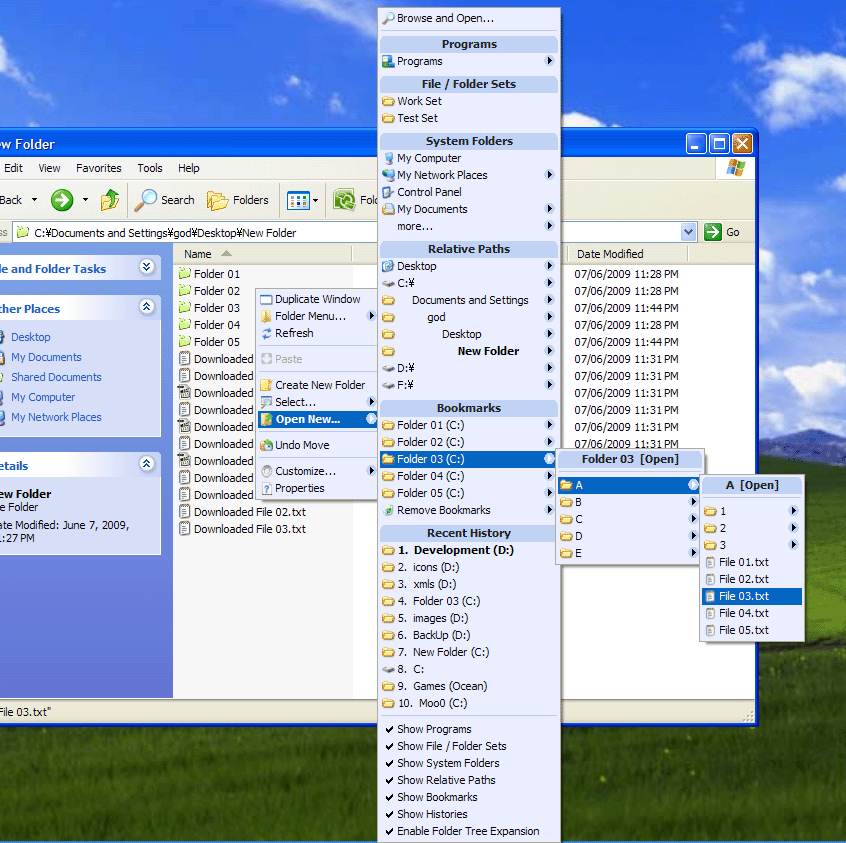
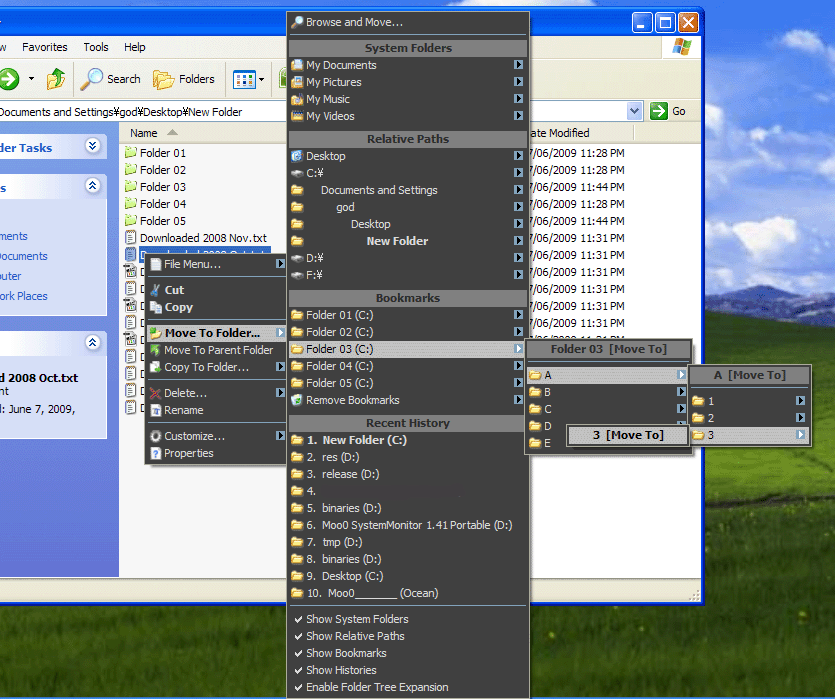
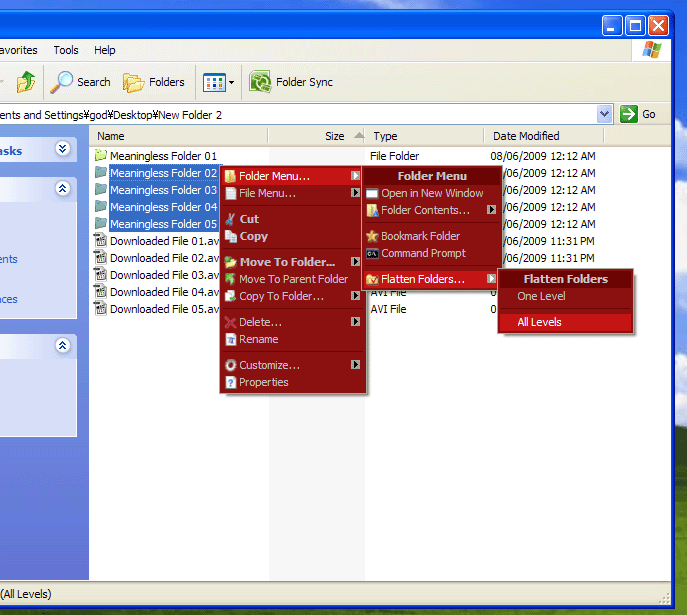
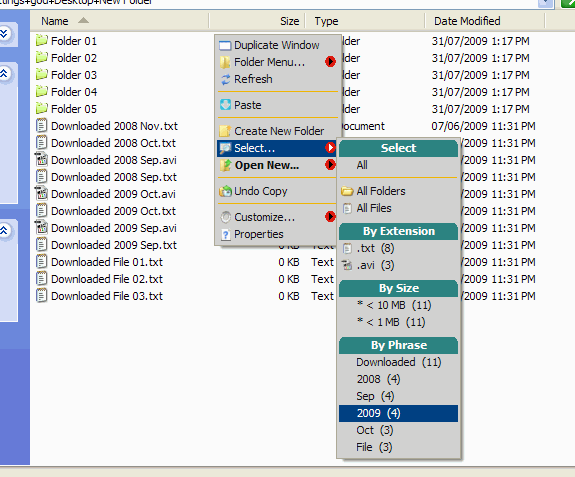
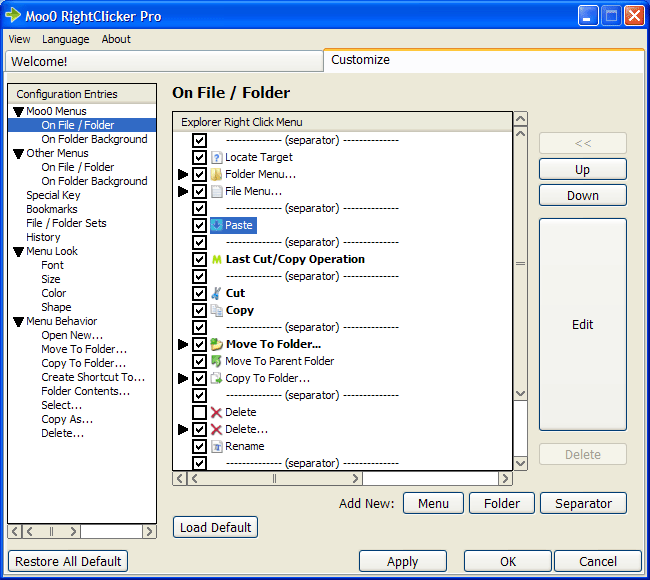
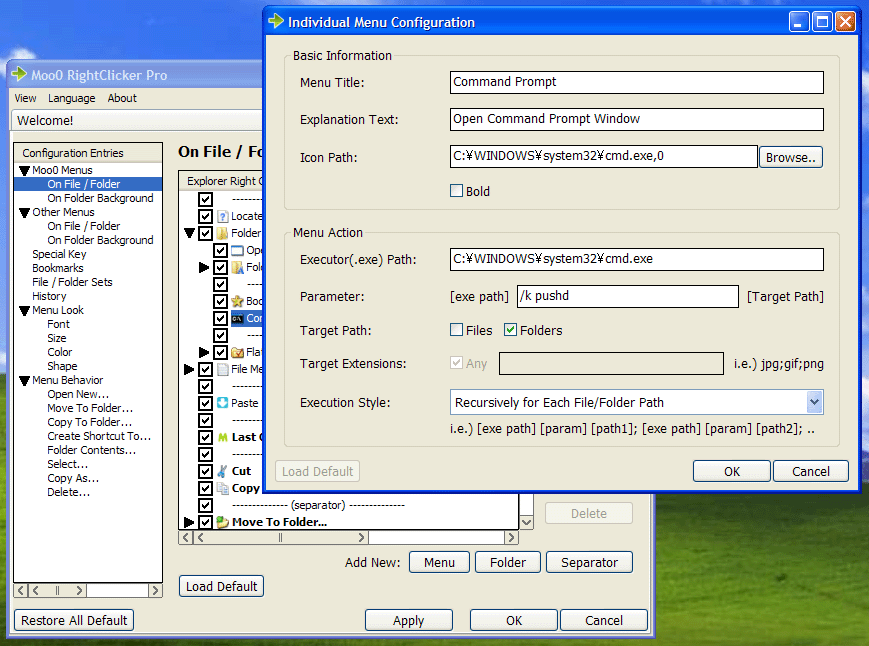
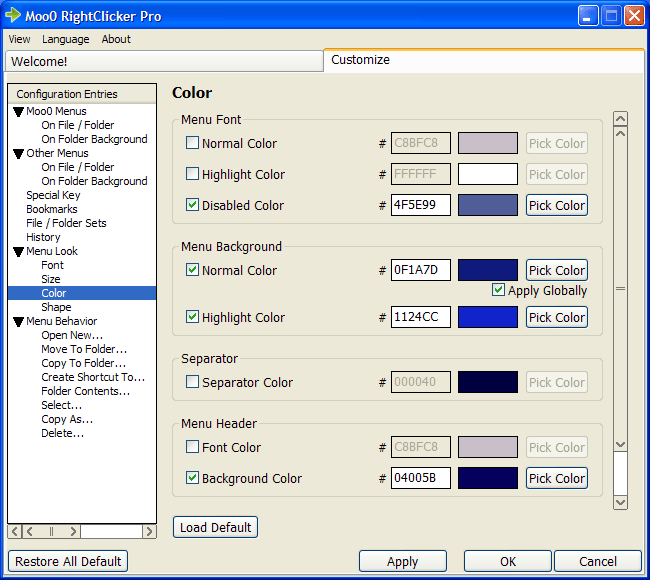
       | 深入地增强你的右键菜单 Moo0右键专家 Pro是增强右键菜单(Windows资源管理器中的右键菜单)的设置。 它增加了很多有用的功能例如复制当前浏览器窗口、打开/移动到/复制到书签文件夹、隐藏默认情况下的菜单等等。 请安装此软件和尽可能地体验它可以带给你的可能。 虽然首先您可能需要一些时间来适应它,你可能会发现这些额外的增强会使你的生活方便很多。 提示:- 请通过隐藏不需要的菜单、重新安排菜单、包装类似的菜单到新建的菜单树文件夹、自己改变每个菜单的图标的等定制来创建自己的优化右键菜单。 - 您可以随时在“自定义..” >“取消隐藏”> ..中取消隐藏默认的右键菜单,如“发送到”。 - 您可以用Shift键+鼠标右击显示所有的菜单。 - 它需要时间去适应一套新的菜单。请试用一段时间。
Persian 支持由 Asom Nookin 提供。非常感谢! Slovenian 支持由 dr. Vinko Kastelic 提供。非常感谢! 更新 (2013/08/21): - Added Chinese (Simplified) (Revision) language support. 中文(简体) (修订) 支持由 Zhang Zhe 提供。非常感谢! | ||||||
| 页面标题: | |||||||
| 页面URL: | |||||||
| HTML 标签: | |||||||
| 语言: | 阿拉伯语, 葡萄牙语(巴西), 白俄罗斯语, 中文(简体), 中文(繁体), 荷兰语, 英语, 法语, 德语, 匈牙利语, 意大利语, 日语, 韩语, 波西语, 波兰语, 俄语, 塞尔维亚语, 斯洛伐克语, Slovenian, 西班牙语, 瑞典语, 土耳其语, Ukrainian, 威尼斯语 - [ 译者 (46) ] | ||||||
| 操作系统: | Windows XP/Vista/7/8.1/10 | 易于使用: | 进阶 | ||||
| 版本: | 1.56 | ||||||
| 最近更新于: | 2018/01/30 [ 更新历史 (35) ] | ||||||
| PAD文件: | [ 如果你正在运行软件列表网站!…… ] | ||||||
| 下载: |
| ||||||
| 大小: | 7.53 MB | ||||||
| 指南: | 使用说明/规格 | ||||||
| 许可证: | 免费试用 (三十天免费试用)
| ||||||
| 反馈: | |||||||
| 常见问题: | ■ (Symptom) The program suddenly doesn't start up one day? stopped working properly? on Windows 10/8.1? This probably happens when "Windows SmartScreen" hinders our program from working. In this case, please try the following before the installation. 1. Before the installation, right-click on the installer file and open the file "Property". 2. At the bottom of "General" tab, if you see "Security: This file came from another computer...", select "Unblock" check box, and "Apply" and "OK". 3. If you install the program after it, it may be able to prevent many problems caused by "Windows SmartScreen" or some other security products. Or, you can actually turn off this problematic feature of Windows itself: (only if you feel too troublesome to do this every single time.) https://ugetfix.com/ask/how-to-disable-windows-smartscreen/ This happens to every software vendor who doesn't or can't donate $300 to Microsoft every single year (EV signature purchase), and especially when the program file is still new. This kind of problems started to get reported since the early of 2019. Windows 7) Shortcut files can't be selected by "Select..." menu. There is a fatal bug in Windows 7 explorer that it crashes whenever it's requested to select shortcut files programmatically. We can't find any other way but to wait for their updates. Windows 7) Moo0 menu doesn't always appear under Library folders. This program is currently functional only under their subfolders. We'll try to support it better soon. Symptom: Some other menus disappear or stop to function. (especially the memus on top) It seems to be a sort of bugs on Windows itself. It almost randomly happens when there are many menus registered (and especially when there are static sub-menus which reserve their individual menu IDs). The followings are the solutions we've found so far. Solution 1) Unregister some of non-Moo0 menus. Especially the ones with static sub-menus (statically defined tree style menus which reserve their individual menu IDs). Our sub-menus are all dynamically displayed without reserving the problematic menu IDs, and they don't seem to cause this problem. However, adding even one simple top level Moo0 menu (or any other 3rd-party program's menu) can trigger this problem when there are those kinds of 3rd-party sub-menus. Solution 2) Update Windows or uninstall some of update patches. This problem appears / disappears depending on which update patches are installed. Solution 3) You can always turn on / off our Moo0 menus from the RightClicker main window. Turning it off gives the same effect with the uninstallation, and our program will not affect the right-click menu what-so-ever. By doing this, 3rd-party menus can regain slightly more room to reserve their menu IDs. We strictly try to follow Microsoft instructions, and also we are very very careful not to cause any of these problems. However, there are also things that we can't control in operating systems. We ask for your understanding. We'll keep investigating this more. (Symptom: Prior to ver. 1.27) Some menus are drawn blank white. This seems to happen due to conflicts with some other programs. Please tell us the other context menu entires shown when our menus are drawn blank white. We'll see what we can do to resolve the conflict. - (from ver. 1.27): We have implimented some counter measures from this version. [Known Conflicts] - NVIDIA nView Desktop Manager (Version 111.75) (Desktop Menu) (Symptom: Prior to ver. 1.23) Impossible to change back from "Simple Mode". Well, you can, but it's only from the "Customize" menu, which is shown when you right click on folder/desktop background. We will fix this confusing behavior on the next update. We are very sorry for the discomfort that you might have experienced. - (from ver. 1.23): We have altered the behavior from this version. | ||||||
| 评论: | Moo0 Right Clicker Enhances Your Context (Right Click) Menu (4.5 Stars Rating - Thank You!) (Windows Tools, Help & Guides | Windows 7, Vista, XP) - Dec 24 2009 Japanese) Moo0 ライトクリッカー Pro 1.22 - エクスプローラのコンテキスト(右クリック)メニューの機能を大幅に拡張する (Vector) - Aug 28 2008 | ||||||
 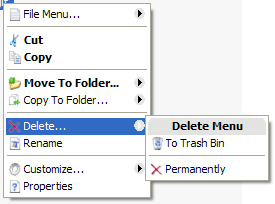 
| 增强你的右键菜单 Moo0右键专家是增强右键菜单(Windows资源管理器中的右键菜单)的设置。 它增加了很多有用的功能例如复制当前浏览器窗口、打开/移动到/复制到书签文件夹、隐藏默认情况下的菜单等等。 请安装此软件和尽可能地体验它可以带给你的可能。 虽然首先您可能需要一些时间来适应它,你可能会发现这些额外的增强会使你的生活方便很多。 该软件的功能是经过挑选和简化的,而且容易上手。 如果你需要所有的功能,请尝试Moo0右键专家Pro。 提示:- - 您可以随时在“自定义..” >“取消隐藏”> ..中取消隐藏默认的右键菜单,如“发送到”。 - - 您可以用Shift键+鼠标右击显示所有的菜单。 - - 它需要时间去适应一套新的菜单。请试用一段时间。
Persian 支持由 Asom Nookin 提供。非常感谢! Slovenian 支持由 dr. Vinko Kastelic 提供。非常感谢! 更新 (2013/08/21): - Added Chinese (Simplified) (Revision) language support. 中文(简体) (修订) 支持由 Zhang Zhe 提供。非常感谢! | |||||||||||||
| 页面标题: | ||||||||||||||
| 页面URL: | ||||||||||||||
| HTML 标签: | ||||||||||||||
| 语言: | 阿拉伯语, 葡萄牙语(巴西), 白俄罗斯语, 中文(简体), 中文(繁体), 荷兰语, 英语, 法语, 德语, 匈牙利语, 意大利语, 日语, 韩语, 波西语, 波兰语, 俄语, 塞尔维亚语, 斯洛伐克语, Slovenian, 西班牙语, 瑞典语, 土耳其语, Ukrainian, 威尼斯语 - [ 译者 (46) ] | |||||||||||||
| 操作系统: | Windows XP/Vista/7/8.1/10 | 易于使用: | 进阶 | |||||||||||
| 版本: | 1.56 | |||||||||||||
| 最近更新于: | 2018/01/30 [ 更新历史 (34) ] | |||||||||||||
| PAD文件: | [ 如果你正在运行软件列表网站!…… ] | |||||||||||||
| 下载: |
 | |||||||||||||
| 大小: | 7.53 MB | |||||||||||||
| 指南: | 使用说明/规格 | |||||||||||||
| 许可证: | 免费 (只可用于非商业的使用) 要在工作场所/网络咖啡吧中使用吗?
| |||||||||||||
| 反馈: | ||||||||||||||
| 常见问题: | ■ (Symptom) The program suddenly doesn't start up one day? stopped working properly? on Windows 10/8.1? This probably happens when "Windows SmartScreen" hinders our program from working. In this case, please try the following before the installation. 1. Before the installation, right-click on the installer file and open the file "Property". 2. At the bottom of "General" tab, if you see "Security: This file came from another computer...", select "Unblock" check box, and "Apply" and "OK". 3. If you install the program after it, it may be able to prevent many problems caused by "Windows SmartScreen" or some other security products. Or, you can actually turn off this problematic feature of Windows itself: (only if you feel too troublesome to do this every single time.) https://ugetfix.com/ask/how-to-disable-windows-smartscreen/ This happens to every software vendor who doesn't or can't donate $300 to Microsoft every single year (EV signature purchase), and especially when the program file is still new. This kind of problems started to get reported since the early of 2019. Windows 7) Shortcut files can't be selected by "Select..." menu. There is a fatal bug in Windows 7 explorer that it crashes whenever it's requested to select shortcut files programmatically. We can't find any other way but to wait for their updates. Windows 7) Moo0 menu doesn't always appear under Library folders. This program is currently functional only under their subfolders. We'll try to support it better soon. Symptom: Some other menus disappear or stop to function. (especially the memus on top) It seems to be a sort of bugs on Windows itself. It almost randomly happens when there are many menus registered (and especially when there are static sub-menus which reserve their individual menu IDs). The followings are the solutions we've found so far. Solution 1) Unregister some of non-Moo0 menus. Especially the ones with static sub-menus (statically defined tree style menus which reserve their individual menu IDs). Our sub-menus are all dynamically displayed without reserving the problematic menu IDs, and they don't seem to cause this problem. However, adding even one simple top level Moo0 menu (or any other 3rd-party program's menu) can trigger this problem when there are those kinds of 3rd-party sub-menus. Solution 2) Update Windows or uninstall some of update patches. This problem appears / disappears depending on which update patches are installed. Solution 3) You can always turn on / off our Moo0 menus from the RightClicker main window. Turning it off gives the same effect with the uninstallation, and our program will not affect the right-click menu what-so-ever. By doing this, 3rd-party menus can regain slightly more room to reserve their menu IDs. We strictly try to follow Microsoft instructions, and also we are very very careful not to cause any of these problems. However, there are also things that we can't control in operating systems. We ask for your understanding. We'll keep investigating this more. (Symptom: Prior to ver. 1.27) Some menus are drawn blank white. This seems to happen due to conflicts with some other programs. Please tell us the other context menu entires shown when our menus are drawn blank white. We'll see what we can do to resolve the conflict. - (from ver. 1.27): We have implimented some counter measures from this version. [Known Conflicts] - NVIDIA nView Desktop Manager (Version 111.75) (Desktop Menu) (Symptom: Prior to ver. 1.23) Impossible to change back from "Simple Mode". Well, you can, but it's only from the "Customize" menu, which is shown when you right click on folder/desktop background. We will fix this confusing behavior on the next update. We are very sorry for the discomfort that you might have experienced. - (from ver. 1.23): We have altered the behavior from this version. | |||||||||||||
| 评论: | Moo0 Right Clicker Enhances Your Context (Right Click) Menu (4.5 Stars Rating - Thank You!) (Windows Tools, Help & Guides | Windows 7, Vista, XP) - Dec 24 2009 Moo0 RightClicker Adds Key Features to Windows' Right-Click Menu (Lifehacker) - Sep 16 2008 Japanese) エクスプローラのメニューをグラフィカルに拡張する「Moo0 ライトクリッカー」 (窓の杜) - Aug 12 2008 | |||||||||||||