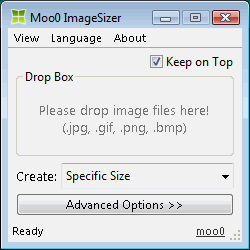 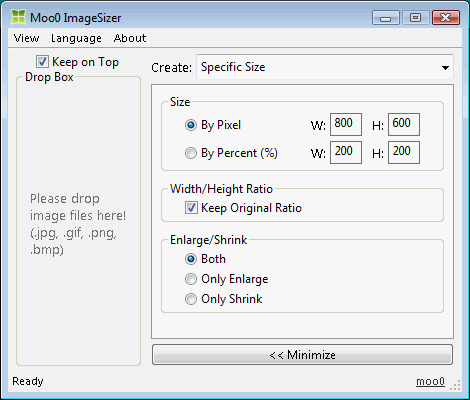
| 改变图像大小 Moo0图像大小调整器使你轻松地修改图片大小。 它非常易用,你只需把你的文件拖进软件界面即可。当你在设计时经常疑惑选择什么大小的图片的时候,这个软件可能非常强大。
Norwegian 支持由 Øistein 提供。非常感谢! 西班牙语 支持由 Descko 提供。非常感谢! | |||||||||||||
| 页面标题: | ||||||||||||||
| 页面URL: | ||||||||||||||
| HTML 标签: | ||||||||||||||
| 语言: | 阿拉伯语, 白俄罗斯语, 葡萄牙语(巴西), 保加利亚语, 中文(简体), 中文(繁体), Croatian, 捷克语, 丹麦语, 荷兰语, 英语, Estonian, Finnish, 法语, 德语, 希腊语, Hebrew, Hindi, 匈牙利语, 印度尼西亚语, 意大利语, 日语, 韩语, Norwegian, 波西语, 波兰语, 葡萄牙语, 罗马尼亚语, 俄语, Serbian (Cyrillic), 斯洛伐克语, Slovenian, 西班牙语, 瑞典语, Thai, 土耳其语, Ukrainian, 越南语, 2 other languages (partial) - [ 译者 (26) ] | |||||||||||||
| 操作系统: | Windows XP/2003/Vista/7/8.1/10 | 易于使用: | 非常简单 | |||||||||||
| 版本: | 1.24 | |||||||||||||
| 最近更新于: | 2019/06/28 [ 更新历史 (21) ] | |||||||||||||
| PAD文件: | [ 如果你正在运行软件列表网站!…… ] | |||||||||||||
| 下载: |
| |||||||||||||
| 大小: | 3.59 MB | |||||||||||||
| 许可证: | 免费 (只可用于非商业的使用) 要在工作场所/网络咖啡吧中使用吗?
| |||||||||||||
| 反馈: | ||||||||||||||
| 常见问题: | ■ (Symptom) The program suddenly doesn't start up one day? stopped working properly? on Windows 10/8.1? This probably happens when "Windows SmartScreen" hinders our program from working. In this case, please try the following before the installation. 1. Before the installation, right-click on the installer file and open the file "Property". 2. At the bottom of "General" tab, if you see "Security: This file came from another computer...", select "Unblock" check box, and "Apply" and "OK". 3. If you install the program after it, it may be able to prevent many problems caused by "Windows SmartScreen" or some other security products. Or, you can actually turn off this problematic feature of Windows itself: (only if you feel too troublesome to do this every single time.) https://ugetfix.com/ask/how-to-disable-windows-smartscreen/ This happens to every software vendor who doesn't or can't donate $300 to Microsoft every single year (EV signature purchase), and especially when the program file is still new. This kind of problems started to get reported since the early of 2019. | |||||||||||||
